

If you’re worried about missing important details while taking minutes of the meeting, here are some tools you’ll definitely find useful.
What's the Best Software for Meeting Minutes (A Quick Comparison)
| Tool | Best For | Starting Price |
| Char | Control over data and AI stack | Free. $8/month for Pro |
| Fellow | Remote Teams | $7/user/mo |
| MeetGeek | Sales Teams | $19/user/mo |
| Diligent | Board Meetings | Custom |
| Fireflies.ai | Transcription | $10/user/mo |
| Beenote | Structured Meetings | $552/yr (10 users) |
| MeetingBooster | Enterprise | Custom |
| Fathom | CRM Integration | Free. $20/month for Premium |
| tl;dv | Video recordings | Free. $18/month for Pro |
Detailed Reviews of the Best Software for Meeting Minutes
1. Char - Best for Complete Control Over Your Data and AI Stack
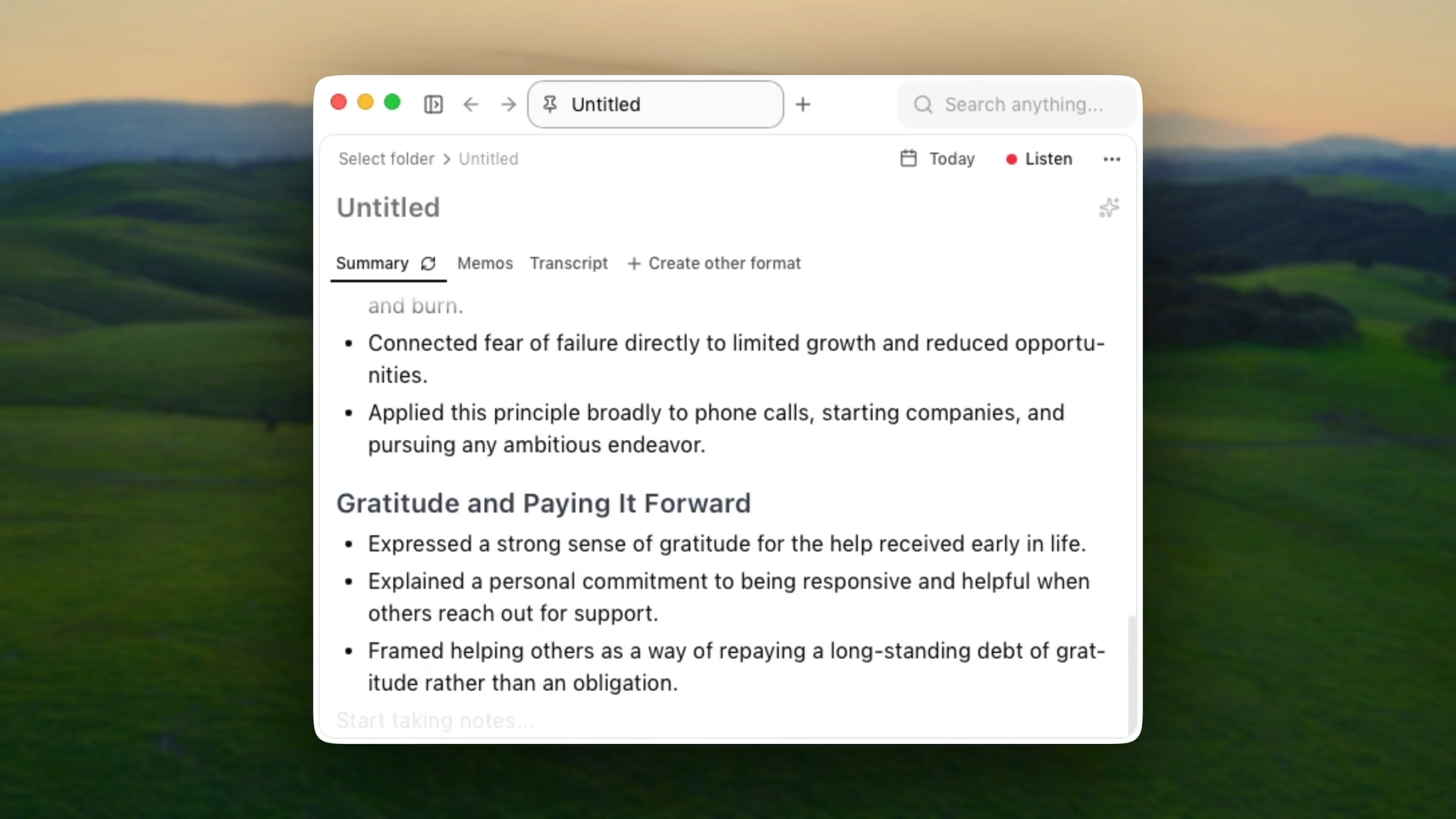
Char is an open-source AI note-taker that stores your data locally and gives you complete control over the AI stack
You decide if your audio, transcripts, or notes ever leave your device. And, you pick your preferred STT and LLM provider, which means you can go completely local if you want to. No forced stack. No lock-in.
How It Works
Char captures system audio without joining meetings as a bot.
During meetings, Char transcribes your conversations in real-time, and when the meeting ends, it combines any notes you might have taken with your transcripts to create the perfect summary.
Key Features
- Your notes are just files: Every meeting saved as a .md file you can open in Obsidian, Notion, VS Code, whatever you use
- Flexible AI: Use our managed service or bring your own key (cloud or local). Switch anytime.
- No meeting bots: System audio capture works on Zoom, Teams, phone calls, in-person
- Custom templates: Structure recurring meetings automatically with community templates or build your own
- Searchable notes: Find anything from any meeting instantly with semantic search and date filters
- Open source: Code is public. Your IT team can audit it, your security team can verify it
Pros
- You actually own your data, files stay on your device, not in some remote database
- No internet required for recording or transcription with local models
- No lock-in. export anytime, switch AI providers anytime, or just stop using it
- No bots in your meetings. More discreet than competitors
- Security teams can audit the code before approving it
- Works for any conversation
Cons
- macOS and Linux only; Windows version coming soon
- No Video recordings
- No built-in CRM integrations (though files export to anything)
Pricing
An unlimited free plan with local transcription or bring-your-own-key. Pro is $8/month for managed cloud service.
2. Fellow - Best for Remote Teams
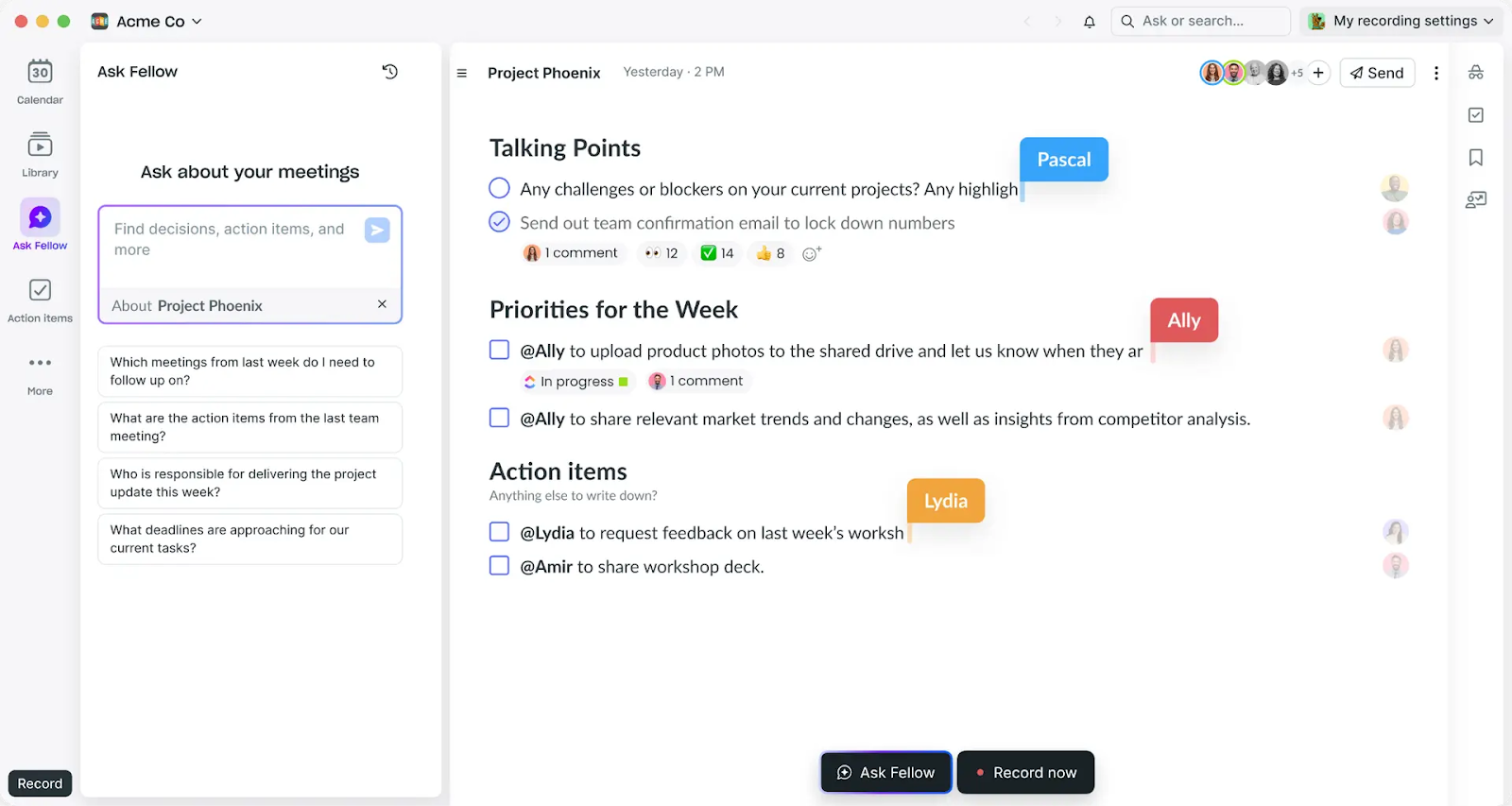
Fellow is the best online meeting minutes software for remote teams that need collaborative meeting management from start to finish.
Unlike tools that only focus on transcription, Fellow covers the entire meeting lifecycle: preparation with shared agendas, live note-taking during meetings, and organized follow-ups afterward.
Key Features
- Collaborative agendas with 500+ templates: Create shared meeting agendas where team members add talking points together, with pre-built templates for 1-on-1s, standups, and retrospectives
- Pre-meeting briefs: Automatic reminders showing what was discussed in previous iterations of recurring meetings
- Ask Fellow (AI Copilot): Chatbot that answers questions about meeting history, drafts follow-up emails, and catches you up on missed meetings
- Centralized library with access controls: All recordings and notes stored in one searchable place with granular permissions for who can view what
- Deep CRM integrations: Automatically syncs meeting summaries and action items to Salesforce, HubSpot, Asana, Jira, and 50+ other tools
- No AI training on your data: Fellow explicitly doesn't use meeting content to train models
Pros
- Comprehensive meeting lifecycle management in one platform
- Strong collaborative features with shared agendas and real-time editing
- Enterprise-grade security (SOC 2, GDPR, HIPAA compliance)
- Excellent for recurring meetings with templates and context continuity
- 92-language transcription support for global teams
Cons
- Bot-based recording joins as visible participant
- Cloud-only processing with no on-premises option
- Free plan limited to 10 AI recordings per month
- Online meetings only; doesn't work for in-person conversations
- Internal meeting focus makes it less robust than dedicated sales intelligence tools
Pricing
Free plan includes 10 AI recordings per user per month. Paid plans start at $7/user/month (3-user minimum) for Pro, and go up to $25/user/month for Business with full admin controls and HIPAA compliance.
3. MeetGeek - Best for Conversation Intelligence and Sales Teams
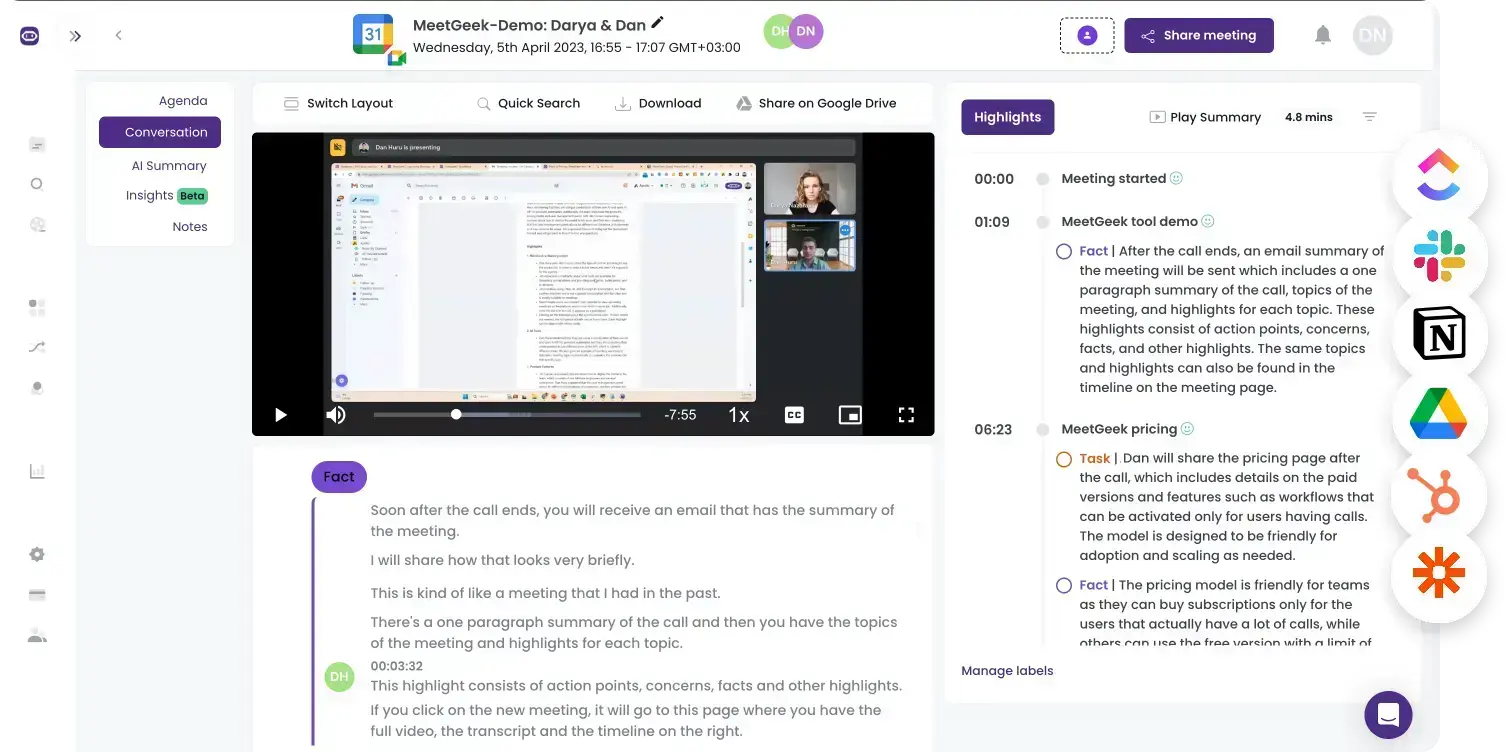
MeetGeek is the best meeting minutes software for sales teams and enterprises that want conversation analytics and performance tracking beyond just transcription.
It's designed for companies that want data-driven insights into their communication patterns, not just meeting notes.
Key Features
- Automatic meeting type detection: AI recognizes your call type and applies context-aware summary templates without manual selection
- Team spaces and analytics: Organize meetings by department with performance metrics tracking engagement, sentiment, and effectiveness at team and individual levels
- Automated workflows: Set rules to auto-share meeting records with specific teams based on meeting type, pushing summaries to CRMs and task management tools
- Custom speech models: Enterprise tier trains the transcription system on your industry-specific terminology for better accuracy
- 50+ language support: Automatic language detection with 95%+ transcription accuracy
- Mobile apps: Record and summarize in-person meetings on iOS and Android, even offline
Pros
- Powerful conversation intelligence with department-level analytics
- Strong compliance certifications (SOC 2, GDPR, CCPA, HIPAA-ready)
- Extensive integration ecosystem (7,000+ apps via Zapier)
- Custom speech models for specialized industries
Cons
- Bot-based only, which can feel intrusive in sensitive conversations
- Aggressive storage limits on lower tiers (free keeps transcripts only 3 months)
- 100-hour monthly limit on Business tier means high-volume teams need Enterprise
- Cloud-only processing with no on-premises option
Pricing
Free plan includes 5 hours of transcription per month with 3 months of transcript storage and 1 month of audio storage. Paid plans start at $19/user/month for Pro with unlimited transcription.
4. Diligent - Best Board Meeting Minutes Software
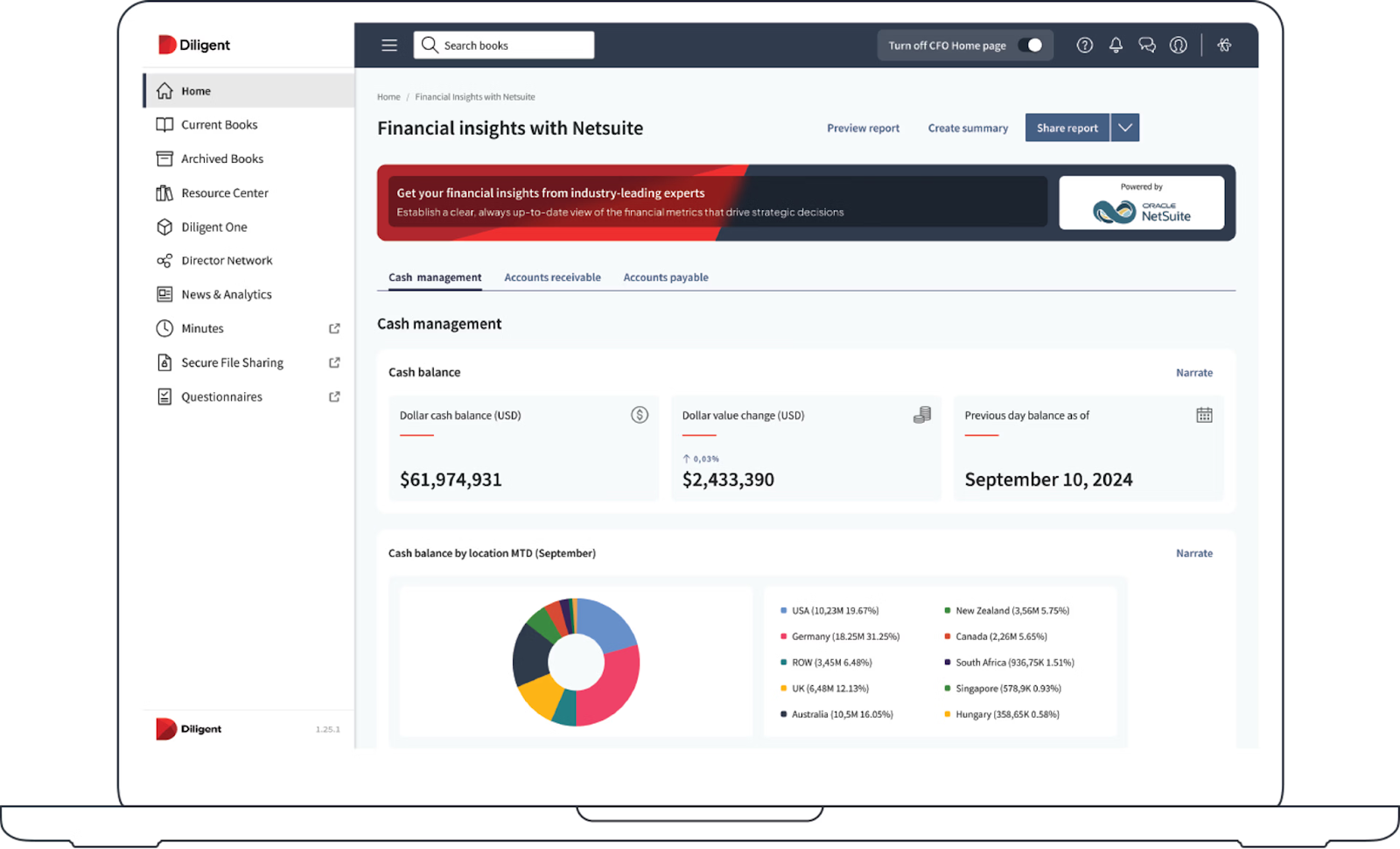
Diligent is the leading board meeting minutes software built specifically for corporate boards, executive committees, and governance-focused organizations that need enterprise-grade security, compliance features, and sophisticated workflow automation. This isn't a general meeting tool—it's designed for high-stakes board-level governance.
Key Features
- Secure board book creation and distribution: Drag-and-drop document uploads with automatic agenda updates, last-minute adjustments that retain director notes, and user-based watermarking for content protection
- AI-powered risk and analytics: Pre-formatted risk reports on cybersecurity, sustainability, shareholder activism, and other critical issues with integrated dashboards for board-level insights
- Digital voting and approvals: Real-time voting directly from the dashboard with comment boxes for explanatory narratives, plus streamlined signature collection
- Board evaluations and D&O questionnaires: Secure creation and monitoring of evaluations using best practice templates with digital signing and exporting
- Version control and audit trails: Directors view updated documents with change tracking, retain notes when materials are updated, and maintain complete audit logs for regulatory compliance
Pros
- Industry-leading security with enterprise-grade encryption and compliance
- Comprehensive governance features beyond basic meeting management
- Trusted by Fortune 500 companies and major organizations globally
- AI-powered analytics provide board-level insights on critical issues
- Seamless mobile access from any device
Cons
- Premium pricing that may be prohibitive for smaller organizations or NGOs
- Some features require additional fees beyond base subscription
- Occasional difficulty renaming or editing documents directly in portal
- Auto-renewal can include significant price increases (20%+) if not negotiated
Pricing
Diligent offers custom pricing based on organization size and requirements. Contact sales for enterprise quotes.
5. Fireflies.ai - Best Meeting Minutes Transcription Software
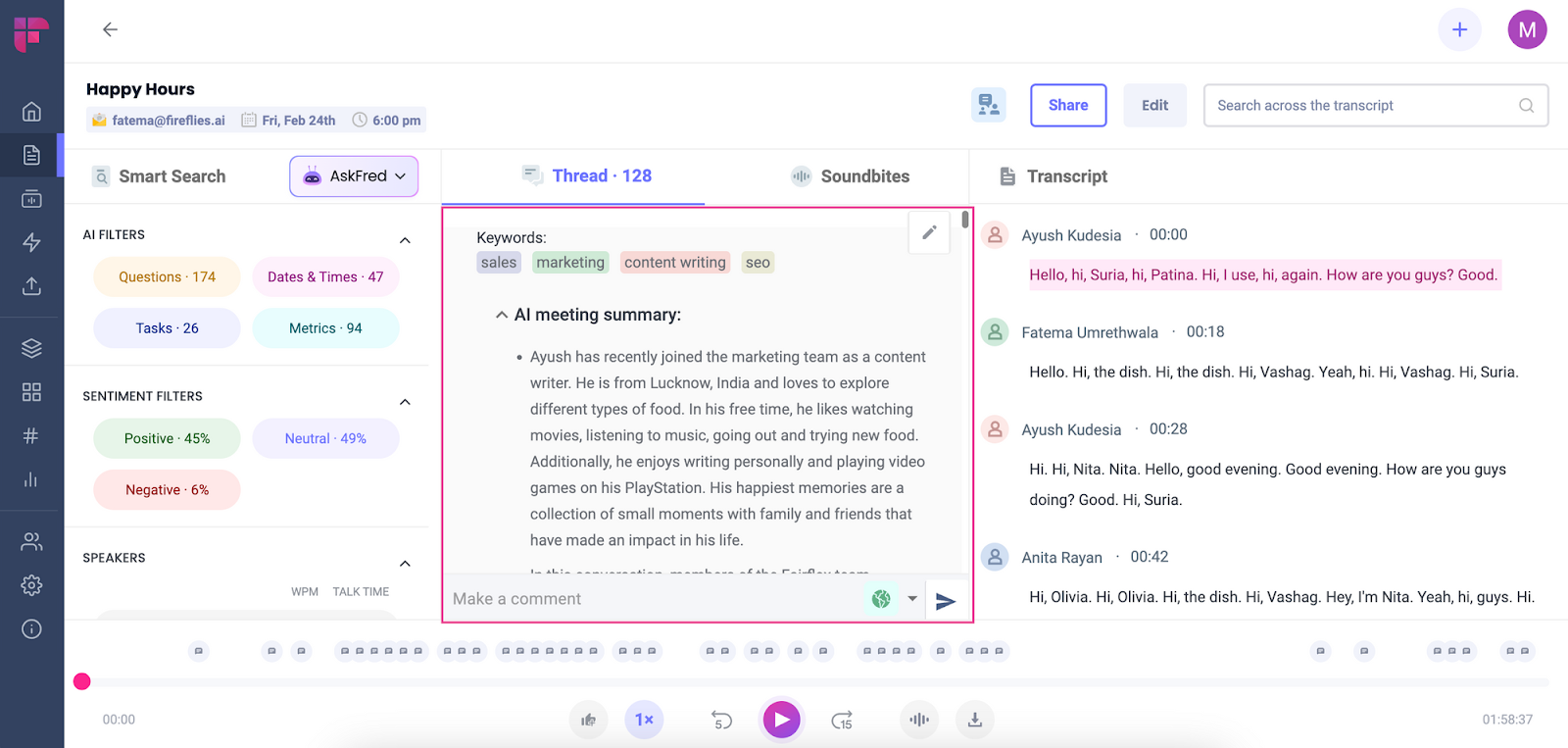
Fireflies.ai is the best meeting minutes transcription software for teams that need searchable archives and powerful search capabilities across all their conversations.
While many tools transcribe meetings, Fireflies excels at helping you find specific information months later through its advanced search functionality.
Key Features
- Powerful search functionality: Search across all meetings using keywords, phrases, topics, or sentiment to find exact conversations and timestamps
- 50+ language support: Transcribes meetings in over 50 languages with automatic language detection
- Sentiment analysis: Tracks positive, negative, and neutral sentiment throughout conversations to identify key emotional moments
- Topic tracking: Automatically identifies and categorizes topics discussed, with custom topic trackers you can create for your specific needs
- Automated workflows: Set rules to auto-share meeting summaries with specific team members or departments based on participants or topics
- Custom vocabulary: Train the system on your industry-specific terminology, acronyms, and product names for better accuracy
- Mobile apps: Record and transcribe in-person meetings using iOS or Android apps
Pros
- Excellent search functionality across entire meeting history
- Sentiment analysis provides conversation insights
- Strong integration ecosystem (7,000+ apps via Zapier)
- Works well for both online and in-person meetings with mobile apps
Cons
- Bot-based recording joins as visible participant
- Free tier has restrictive storage limits (transcripts kept only 3 months)
- 100-hour monthly limit on Business tier
- Cloud-only processing with no local option
Pricing
Free plan includes 800 minutes of storage with 3 months of transcript retention and 1 month of audio storage. Pro plan starts at $10/user/month with unlimited transcription. Business plan at $19/user/month includes advanced analytics. Enterprise pricing is custom.
6. Beenote - Best for Collaborative Agenda Building and Governance
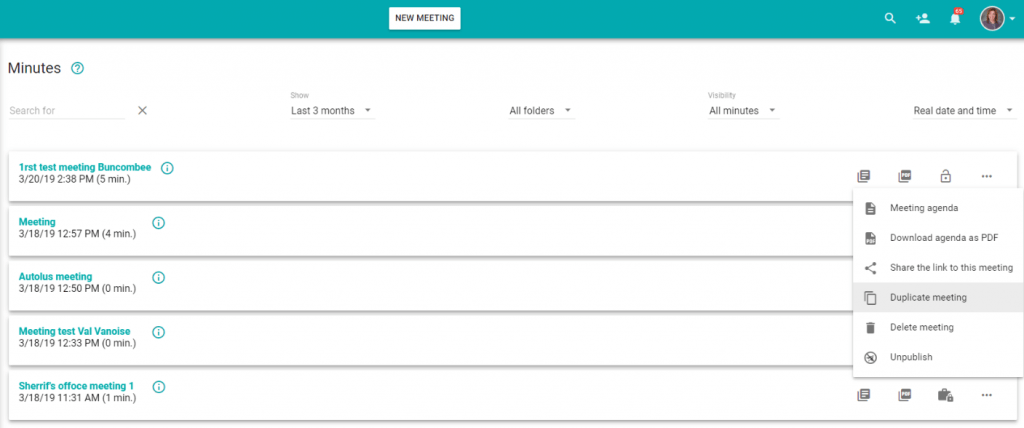
Beenote is the best minutes software for teams that need structured, collaborative meeting workflows without AI automation. Unlike AI tools that automate everything, Beenote focuses on collaborative planning, real-time note-taking, and organized follow-up with a generous free tier.
Key Features
- Collaborative draft agendas: Team members see the writing status and can add content before meetings, ensuring nothing important gets missed
- Multiple items per agenda topic: Each agenda item can have multiple notes, decisions, and tasks, all organized under one discussion point
- Timekeeper per subject: Built-in timer helps you know when to move to the next topic, saving precious meeting time
- Voice recording segments: Record specific parts of discussions or entire agenda items for reference later
- Task synchronization: Assigned tasks sync directly to Google Task or Microsoft To Do, optimizing follow-ups without leaving your workflow
- Customizable templates: Create different formats for various meeting types like board meetings, team standups, or project reviews
Pros
- Strong governance features for boards and executive committees
- Integration with Microsoft 365, Teams, and Google Workspace
- Grammar checking with Antidote integration
- Free tier is genuinely useful for small teams
Cons
- Manual note-taking required—no AI transcription
- No Slack integration despite being a popular team communication tool
- Learning curve for users unfamiliar with structured meeting management
- Mobile apps available but desktop experience is primary focus
Pricing
Beenote is free forever with basic features. Paid plans start at $552/year for 10 users with additional collaboration and branding features.
7. MeetingBooster - Best Enterprise Meeting Minutes Software
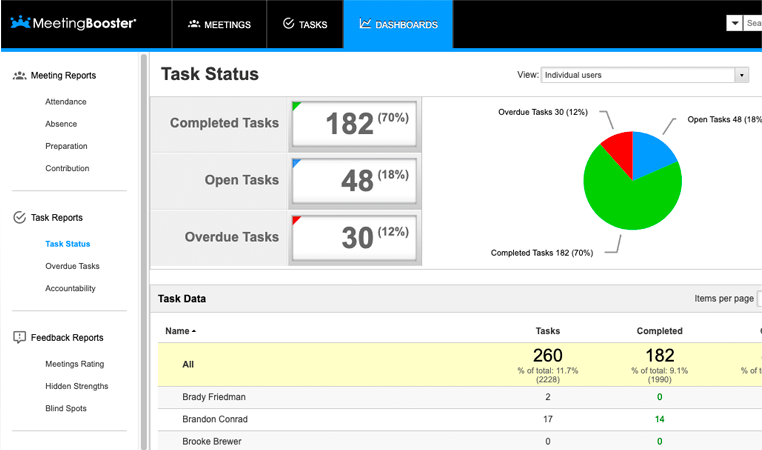
MeetingBooster is best for mid-size to large companies that run structured meetings with serious accountability requirements. Think project change management meetings, board sessions, and cross-functional team coordination where nothing can slip through the cracks.
Key Features
- Meeting series functionality: Automatically groups related meetings together, making it easy to track recurring items and see action items across an entire project or committee
- Pre-meeting task assignment: Assign tasks that need completion before meetings, with status tracking to hold attendees accountable
- Advanced meeting tools: Built-in voting, pros/cons analysis, and rating features to facilitate decisions during meetings
- Comprehensive task management: Full task system with due dates, priorities, and cross-meeting project tracking that syncs seamlessly to Outlook tasks
- Meeting agenda module: Separate module for agenda creation that forces pre-planning and prevents off-topic additions during meetings
- Parking topics feature: Can park both main topics and sub-topics for future discussion, with automatic carry-forward to next meetings
Pros
- Powerful for complex enterprise workflows with multiple stakeholders
- Deep Outlook integration makes adoption easier in Microsoft-heavy organizations
- Meeting series feature provides excellent continuity for recurring meetings
- Advanced meeting facilitation tools (voting, pros/cons) improve decision quality
- Proven track record with 30+ years in the market
Cons
- Interface feels more traditional/corporate compared to modern tools
- Requires manual note-taking during meetings
- Limited flexibility in some task management functions
- Steeper learning curve than simpler alternatives
Pricing
MeetingBooster offers custom pricing based on organization size and needs. They provide site licenses for large deployments and on-premises installation options for enterprises with strict data requirements.
8. Fathom - Best for Sales CRM Integration
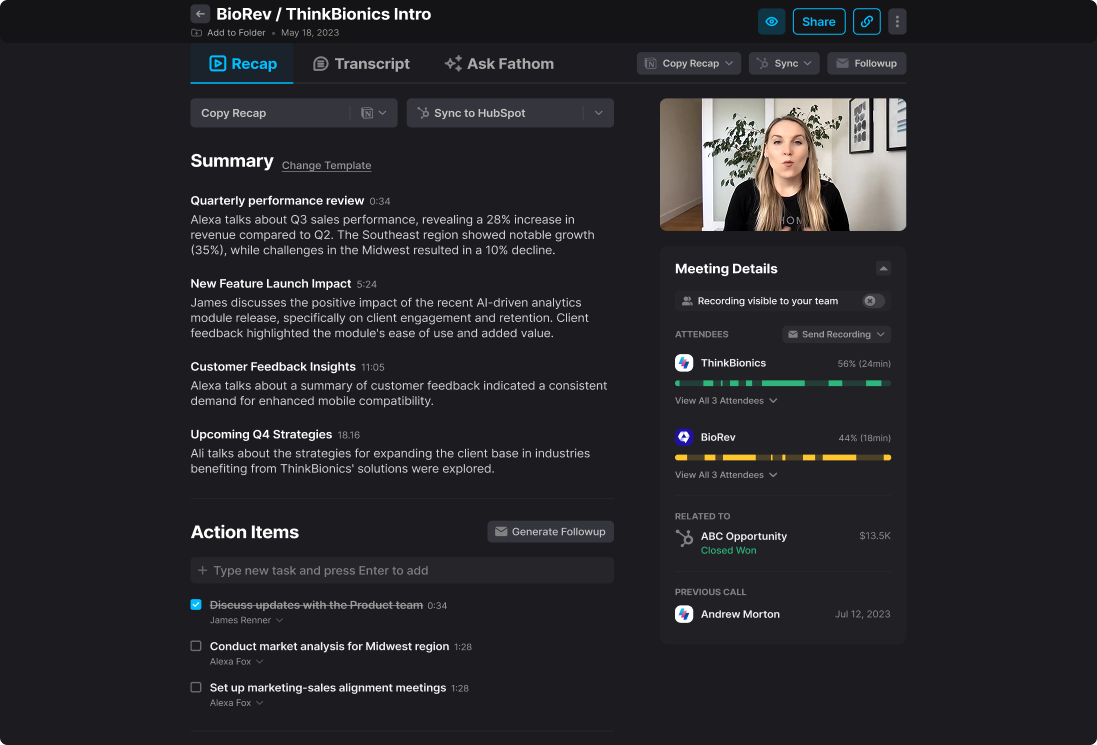
Fathom is the best meeting minutes software for sales teams that need automatic CRM updates without manual data entry. While other tools require you to copy-paste summaries into your CRM, Fathom automatically logs everything to Salesforce, HubSpot, and other platforms immediately after each call.
Key Features
- Automatic CRM logging: Meeting summaries sync automatically to Salesforce, HubSpot, and Close after every call
- Free forever plan: Unlimited meetings, unlimited transcription, completely free for individuals
- Instant highlights: Click a button during meetings to create timestamped highlights of important moments
- AI-generated summaries: Automatic summaries with key points, action items, and next steps
- Multi-language support: Transcribes meetings in 28 languages
- Team collaboration: Share meeting clips and highlights with teammates instantly
Pros
- Completely free for unlimited meetings
- Excellent CRM integration eliminates manual data entry
- Simple, clean interface with minimal setup required
- Fast AI processing—summaries available within minutes
Cons
- Bot-based recording joins as visible participant
- Primarily designed for sales use cases
- Limited customization compared to enterprise tools
- Fewer advanced analytics than dedicated conversation intelligence platforms
Pricing
Free forever for individuals with unlimited meetings and transcription. Team plans available with additional collaboration features and admin controls.
9. tl;dv - Best Free Meeting Recorder with AI Summaries
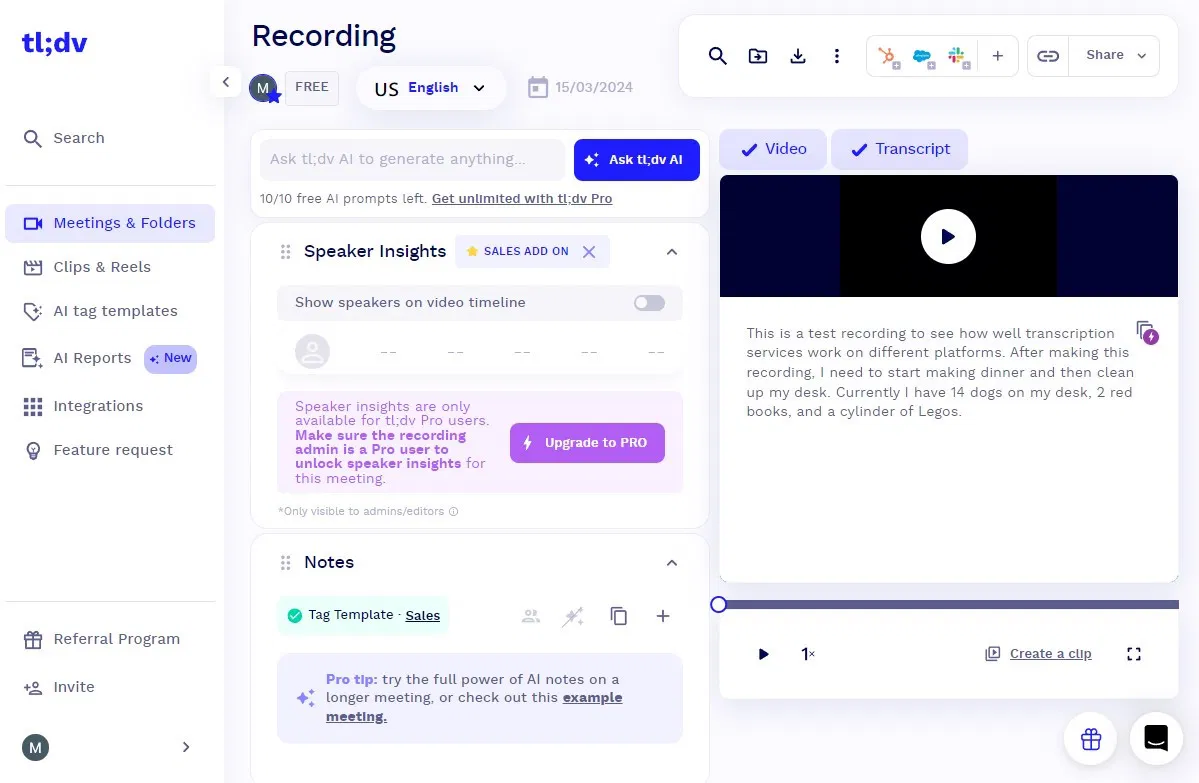
tl;dv is the best free meeting minutes software for teams that want unlimited video recordings. Unlike other "free" options with restrictive limits, tl;dv offers genuinely unlimited recordings on its free plan, making it ideal for individuals and small teams on tight budgets.
Key Features
- AI-generated summaries: Automatic summaries with key takeaways, action items, and decisions
- Timestamped highlights: Click during meetings to bookmark important moments with timestamps
- Video clip sharing: Create and share short video clips from longer meetings
- 20+ language support: Transcribes meetings in multiple languages
- Meeting library: Searchable archive of all recordings with tags and filters
- Integration with tools: Connects to Slack, Notion, Google Docs, CRM systems
Pros
- Truly unlimited recordings on free plan (no monthly hour caps)
- Video clip feature makes it easy to share key moments
- Simple, intuitive interface with minimal setup
- Works well for both Zoom and Google Meet
Cons
- Bot-based recording joins as visible participant
- Limited to Zoom and Google Meet only
- Advanced features like custom vocabulary require paid plans
- Cloud-only processing with no local option
Pricing
Free plan includes unlimited recordings and AI summaries. Pro plan starts at $18/user/month with additional features like speaker insights, custom branding, and advanced integrations.
Key Features That Matter in Meeting Minutes Software
When evaluating meeting minutes software, focus on these five categories:
1. Transcription Accuracy
Accuracy is non-negotiable if you're relying on automated transcription. Look for:
- 90%+ accuracy rates for clear audio
- Speaker identification capabilities
- Support for technical terminology and industry jargon
- Custom vocabulary training for specialized terms
- Multi-language support if needed
Most AI meeting minutes software achieves 90-95% accuracy in ideal conditions, but accuracy drops significantly with background noise, accents, or multiple speakers talking simultaneously.
2. Privacy & Security
For sensitive conversations, privacy architecture matters more than compliance certifications:
- Local-first processing (Char) provides maximum privacy
- End-to-end encryption protects data in transit
- Compliance certifications (HIPAA, SOC 2, GDPR) verify security practices
- Data retention policies control how long recordings are stored
- Access controls manage who can view sensitive meetings
If your conversations involve confidential information, prioritize tools with local processing or strong encryption over convenient cloud-based options.
3. Integrations
Meeting minutes software should connect with your existing workflow:
- Calendar integration (Google Calendar, Outlook) for automatic meeting detection
- CRM systems (Salesforce, HubSpot) for sales and customer data
- Project management (Asana, Jira, Monday.com) for task tracking
- Communication platforms (Slack, Teams) for sharing summaries
- Document storage (Google Drive, Dropbox) for archival
The best integrations are bidirectional—not just pushing data out, but pulling context in to make summaries more relevant.
4. Collaboration Features
Teams need to work together on meeting documentation:
- Real-time co-editing for collaborative note-taking
- Commenting and mentions for feedback and questions
- Shared agendas built collaboratively before meetings
- Approval workflows for formal minutes requiring sign-off
- Version control to track changes and revert if needed
Remote teams particularly benefit from strong collaboration features that keep everyone aligned regardless of location.
5. Search & Retrieval
Meeting minutes are only valuable if you can find information later:
- Keyword search across all transcripts and summaries
- Semantic search that understands context and intent
- Filter by date, participant, or meeting type
- Topic-based organization and automatic categorization
- Quick access to specific timestamps in recordings
The difference between a searchable meeting archive and 100 unsearchable documents is the difference between institutional knowledge and lost information.
Our Top Recommendation
If you value both functionality and control, Char is the only tool on this list built for you.
You get AI-powered features without giving up ownership of your data. You get enterprise-grade functionality without vendor lock-in. You get ease of use without sacrificing flexibility.
This isn’t a bait and switch. You can try the tool out for free, and if you decide it's not for you, just export everything and walk away. That’s the deal!


